Clean The Library Script
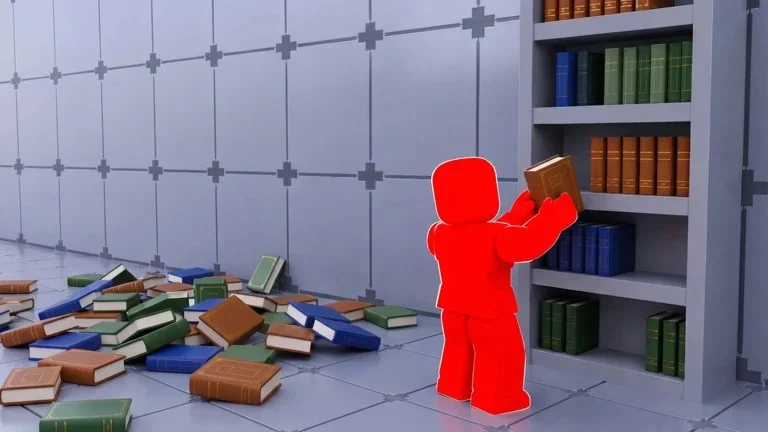
Clean The Library is a fun Roblox simulation game where players take on the role of a cleaner responsible for keeping a busy library tidy. Your objective is to collect trash, organize books, complete cleaning tasks, and earn rewards to unlock better equipment and upgrades. As you continue playing, new areas, tools, and challenges become available, making the game more rewarding over time.
Because cleaning every section manually can take time, some players search online for third-party scripts that claim to automate gameplay or speed up progression. Before downloading or using any unofficial software, it’s important to understand what these tools are, the potential risks involved, and the safest ways to improve your gameplay.
Table of Contents
What Is Clean The Library?
Clean The Library is a Roblox cleaning simulator where players collect trash, organize books, complete objectives, and upgrade their equipment to become more efficient cleaners. The game rewards consistency, smart upgrades, and completing tasks quickly to earn more in-game currency.
As you progress, you’ll unlock better tools, larger cleaning areas, and additional rewards that help you become a more successful cleaner.
Download & Copy All Clean The Library Script (2026)Clean The library Script
Clean The library Script
-- Simple Book Organizer with Single Toggle
local Players = game:GetService("Players")
local ReplicatedStorage = game:GetService("ReplicatedStorage")
local Workspace = game:GetService("Workspace")
local CollectionService = game:GetService("CollectionService")
local UserInputService = game:GetService("UserInputService")-- Settings
local Settings = {
Enabled = false,
FastMode = false -- Optional: can add as sub-toggle
}-- GUI Creation
local function CreateUI()
local screenGui = Instance.new("ScreenGui")
screenGui.Name = "BookOrganizerGUI"
screenGui.Parent = Players.LocalPlayer:WaitForChild("PlayerGui")
-- Main Frame
local mainFrame = Instance.new("Frame")
mainFrame.Size = UDim2.new(0, 300, 0, 120)
mainFrame.Position = UDim2.new(0.5, -150, 0.5, -60)
mainFrame.BackgroundColor3 = Color3.fromRGB(25, 25, 35)
mainFrame.BackgroundTransparency = 0.05
mainFrame.BorderSizePixel = 0
mainFrame.ClipsDescendants = true
mainFrame.Parent = screenGui
-- Title
local title = Instance.new("TextLabel")
title.Size = UDim2.new(1, 0, 0, 35)
title.Position = UDim2.new(0, 0, 0, 0)
title.BackgroundColor3 = Color3.fromRGB(50, 50, 70)
title.BackgroundTransparency = 0.3
title.Text = "📚 Book Organizer"
title.TextColor3 = Color3.fromRGB(255, 255, 255)
title.TextSize = 16
title.Font = Enum.Font.GothamBold
title.BorderSizePixel = 0
title.Parent = mainFrame
-- Close Button
local closeBtn = Instance.new("TextButton")
closeBtn.Size = UDim2.new(0, 25, 0, 25)
closeBtn.Position = UDim2.new(1, -30, 0, 5)
closeBtn.BackgroundColor3 = Color3.fromRGB(200, 50, 50)
closeBtn.BackgroundTransparency = 0.5
closeBtn.Text = "✕"
closeBtn.TextColor3 = Color3.fromRGB(255, 255, 255)
closeBtn.TextSize = 14
closeBtn.Font = Enum.Font.GothamBold
closeBtn.BorderSizePixel = 0
closeBtn.Parent = mainFrame
-- Status Label
local statusLabel = Instance.new("TextLabel")
statusLabel.Size = UDim2.new(1, -20, 0, 25)
statusLabel.Position = UDim2.new(0, 10, 0, 40)
statusLabel.BackgroundTransparency = 1
statusLabel.Text = "🔴 Disabled"
statusLabel.TextColor3 = Color3.fromRGB(255, 100, 100)
statusLabel.TextSize = 14
statusLabel.Font = Enum.Font.Gotham
statusLabel.TextXAlignment = Enum.TextXAlignment.Left
statusLabel.Parent = mainFrame
-- Toggle Button
local toggleBtn = Instance.new("TextButton")
toggleBtn.Size = UDim2.new(0, 80, 0, 35)
toggleBtn.Position = UDim2.new(1, -90, 0, 70)
toggleBtn.BackgroundColor3 = Color3.fromRGB(200, 60, 60)
toggleBtn.BackgroundTransparency = 0.2
toggleBtn.Text = "START"
toggleBtn.TextColor3 = Color3.fromRGB(255, 255, 255)
toggleBtn.TextSize = 14
toggleBtn.Font = Enum.Font.GothamBold
toggleBtn.BorderSizePixel = 0
toggleBtn.Parent = mainFrame
-- Dragging
local dragging = false
local dragStart, startPos
mainFrame.InputBegan:Connect(function(input)
if input.UserInputType == Enum.UserInputType.MouseButton1 then
dragging = true
dragStart = input.Position
startPos = mainFrame.Position
end
end)
mainFrame.InputEnded:Connect(function(input)
if input.UserInputType == Enum.UserInputType.MouseButton1 then
dragging = false
end
end)
UserInputService.InputChanged:Connect(function(input)
if dragging and input.UserInputType == Enum.UserInputType.MouseMovement then
local delta = input.Position - dragStart
mainFrame.Position = UDim2.new(startPos.X.Scale, startPos.X.Offset + delta.X, startPos.Y.Scale, startPos.Y.Offset + delta.Y)
end
end)
closeBtn.MouseButton1Click:Connect(function()
Settings.Enabled = false
screenGui:Destroy()
end)
return screenGui, toggleBtn, statusLabel
end-- Main Script Logic
local gui, toggleBtn, statusLabel = CreateUI()
local isRunning = false
local currentCoroutine = nillocal Loader = require(ReplicatedStorage.Packages.Loader)
local ReplicaController = require(Loader.Shared.Utility.ReplicaController)
local BooksData = require(Loader.Shared.Data.Books)local LibraryReplica = nil
for _, r in pairs(ReplicaController._replicas) do
if r.Class == "Library" then LibraryReplica = r break end
end
if not LibraryReplica then
ReplicaController.ReplicaOfClassCreated("Library", function(replica) LibraryReplica = replica end)
while not LibraryReplica do task.wait() end
endlocal Library = Workspace.Library
local BooksFolder = Library.Books
local player = Players.LocalPlayer-- Setup Camera
player.CameraMode = Enum.CameraMode.Classic
player.CameraMinZoomDistance = 20
task.spawn(function() task.wait(0.1) player.CameraMinZoomDistance = 0.5 end)local shelfModels = {}
for _, shelfModel in ipairs(CollectionService:GetTagged("Shelf")) do
shelfModels[shelfModel.Name] = shelfModel
endlocal function getShelfAssignedSeries(shelfId)
local shelfData = LibraryReplica.Data.Shelves[shelfId]
if not shelfData then return nil end
for _, placedBook in pairs(shelfData.Books) do
local bookName = typeof(placedBook) == "Instance" and placedBook.Name or placedBook
local seriesName = bookName:match("^(.-)_(.+)$")
if seriesName then return seriesName end
end
endlocal function findShelfForSeries(seriesName, genreName, volumeCount)
for shelfId, shelfData in pairs(LibraryReplica.Data.Shelves) do
if not shelfData.Completed and shelfData.Category == genreName then
local shelfModel = shelfModels[shelfId]
if shelfModel and shelfModel:GetAttribute("Width") == volumeCount then
if getShelfAssignedSeries(shelfId) == seriesName then return shelfModel end
end
end
end
for shelfId, shelfData in pairs(LibraryReplica.Data.Shelves) do
if not shelfData.Completed and shelfData.Category == genreName then
local shelfModel = shelfModels[shelfId]
if shelfModel and shelfModel:GetAttribute("Width") == volumeCount then
if not getShelfAssignedSeries(shelfId) and next(shelfData.Books) == nil then return shelfModel end
end
end
end
endlocal function teleportTo(obj)
local char = player.Character
local root = char and char:FindFirstChild("HumanoidRootPart")
local part = obj:IsA("Model") and (obj.PrimaryPart or obj:FindFirstChildOfClass("BasePart")) or obj
if root and part then
root.CFrame = CFrame.new(part.Position + Vector3.new(0, 2, 0))
task.wait(0.05)
end
endlocal function organizeBooks()
for _, book in ipairs(BooksFolder:GetChildren()) do
if not isRunning then break end
task.wait(0.02)
local seriesName, volumeStr = book.Name:match("^(.-)_(.+)$")
local volumeNum = tonumber(volumeStr)
if seriesName and volumeNum then
local genreName, bookInfo = BooksData.GetCategory(seriesName)
if genreName and bookInfo then
local shelfModel = findShelfForSeries(seriesName, genreName, bookInfo.VolumeCount)
if shelfModel then
local shelfData = LibraryReplica.Data.Shelves[shelfModel.Name]
if not (shelfData and shelfData.Books[tostring(volumeNum)]) then
teleportTo(book)
LibraryReplica:FireServer("Grab", book)
task.wait(0.1)
teleportTo(shelfModel)
LibraryReplica:FireServer("Place", shelfModel, volumeNum - 1)
task.wait(0.4)
end
end
end
end
end
end-- Toggle functionality
local function toggleScript()
isRunning = not isRunning
if isRunning then
toggleBtn.Text = "STOP"
toggleBtn.BackgroundColor3 = Color3.fromRGB(60, 200, 60)
statusLabel.Text = "🟢 Running..."
statusLabel.TextColor3 = Color3.fromRGB(100, 255, 100)
Settings.Enabled = true
if currentCoroutine then
task.cancel(currentCoroutine)
end
currentCoroutine = task.spawn(function()
while isRunning do
local success, err = pcall(organizeBooks)
if not success then
warn("Error: " .. err)
statusLabel.Text = "❌ Error: " .. err
statusLabel.TextColor3 = Color3.fromRGB(255, 100, 100)
task.wait(2)
end
task.wait(5) -- Wait before next cycle
end
end)
else
toggleBtn.Text = "START"
toggleBtn.BackgroundColor3 = Color3.fromRGB(200, 60, 60)
statusLabel.Text = "🔴 Disabled"
statusLabel.TextColor3 = Color3.fromRGB(255, 100, 100)
Settings.Enabled = false
if currentCoroutine then
task.cancel(currentCoroutine)
currentCoroutine = nil
end
end
endtoggleBtn.MouseButton1Click:Connect(toggleScript)-- Cleanup
game:GetService("Players").LocalPlayer:WaitForChild("PlayerGui").ChildRemoved:Connect(function(child)
if child.Name == "BookOrganizerGUI" and isRunning then
isRunning = false
if currentCoroutine then
task.cancel(currentCoroutine)
end
end
end)print("✅ Book Organizer loaded! Click START to begin organizing.")
You can also check Taxi Boss Script
What Are Third-Party Scripts?
Third-party scripts are unofficial Lua programs created by members of the Roblox community rather than by the developers of Clean The Library. These tools often claim to automate gameplay or provide additional utilities that are not part of the official game.
Because they are unofficial, these scripts are not supported or endorsed by Roblox or the game’s developers.
Commonly Advertised Features
Community-created scripts often advertise features such as:
- Automatic cleaning
- Automatic trash collection
- Automatic book collection
- Automatic task completion
- Automatic item collection
- Movement adjustments
- Anti-idle functions
- Custom graphical interfaces
- Performance settings
- Configurable options
The available features vary depending on the script version, and many stop working after game updates.
Why Do Players Search for Scripts?
Players often look for unofficial tools because they want to:
- Reduce repetitive gameplay.
- Finish cleaning tasks more quickly.
- Earn rewards more efficiently.
- Save time while progressing.
- Unlock equipment faster.
- Customize their gameplay experience.
Although these reasons explain why scripts are searched for, unofficial software also comes with several important risks.
Risks of Using Third-Party Software
Before downloading any unofficial tool, it’s important to understand the possible consequences.
Account Restrictions
Using unauthorized software may violate Roblox’s Terms of Use or the rules of Clean The Library, potentially leading to account warnings, temporary suspensions, or permanent restrictions.
Security Risks
Programs downloaded from unknown websites may contain malware, spyware, or other harmful software that can compromise your Roblox account or device.
Compatibility Issues
Clean The Library receives updates that frequently change game systems, causing many unofficial tools to stop working until updated.
Performance Problems
Some third-party software may introduce lag, crashes, bugs, or unexpected gameplay behavior that negatively affects your experience.
Legitimate Ways to Progress Faster
If you want to improve your progress without relying on unofficial software, these strategies can help.
Upgrade Your Cleaning Equipment
Investing in better tools allows you to clean more efficiently and complete objectives faster.
Complete Daily Rewards
Daily login bonuses and special missions often provide extra currency and useful rewards.
Learn the Map
Knowing where trash, books, and objectives usually appear helps reduce unnecessary movement and increases efficiency.
Prioritize High-Reward Tasks
Focus on objectives that provide the highest rewards before moving on to smaller tasks.
Play During Events
Limited-time events frequently offer bonus rewards, exclusive items, and additional opportunities to earn currency.
Keep Your Inventory Organized
Managing your tools and upgrades effectively can make cleaning sessions smoother and more productive.
Frequently Asked Questions
What is Clean The Library?
Clean The Library is a Roblox simulation game where players clean library areas, collect trash, organize books, complete objectives, and earn rewards to unlock better equipment and upgrades.
What are third-party scripts?
Third-party scripts are unofficial programs created by community members that claim to automate gameplay or add additional utilities. They are not supported by Roblox or the game’s developers.
Are unofficial scripts safe?
Their safety depends on the source, but they may introduce security risks and may violate Roblox’s Terms of Use.
Can using unofficial software result in account penalties?
Yes. Using unauthorized third-party software may lead to account warnings, temporary suspensions, or permanent account restrictions.
How can I progress faster without scripts?
Upgrading your cleaning tools, completing daily rewards, learning the map, participating in events, and focusing on high-value objectives are some of the best legitimate ways to progress.
Conclusion
Clean The Library offers a relaxing and rewarding Roblox experience that encourages players to improve their efficiency through better equipment, smart planning, and consistent gameplay. While some players search for third-party scripts that claim to automate tasks or accelerate progression, these tools may introduce security concerns, compatibility issues, and the possibility of account penalties.
Learning the game’s mechanics, upgrading your equipment, completing daily missions, and participating in official events provide a safer and more enjoyable way to build your progress while experiencing everything Clean The Library has to offer.